A week at the gym with Regimen.
Strength training for iPhone, with a coach.
You tell Regimen what you're training for. It builds a plan around your schedule and your equipment, tells you what to lift in each workout based on what you've logged, and helps you change a workout when something gets in the way. The coach is AI, and it knows your plan and the sets you've logged. The week below is an example you can tap through.
Monday
6:40 PM
It's Monday evening and you're four sets into an upper-body workout. The workout below works, so you can log the next set, or pick one of these to see what the app does.
You log each set as you go. When you finish an exercise, you can rate how hard it felt.
Upper body
4 of 14 sets
Next
Standing Barbell Overhead Press
Set 2 of 3
- Set 1, 95 pounds for 6 reps
- Set 2, current
- Set 3, to do
All exercises
-
Incline Dumbbell Bench Press, 3 of 3 sets
-
Standing Barbell Overhead Press, 1 of 3 sets
-
One-Arm Dumbbell Row, 0 of 3 sets
-
Dumbbell Lateral Raise, 0 of 3 sets
-
Cable Triceps Pressdown, 0 of 2 sets
Your coach: What needs to change in today’s workout? Tell me what’s taken, what hurts, or how much time you have.
Skip Cable Triceps Pressdown today
Your coach: Done. Cable Triceps Pressdown is out today. Your logged sets are unchanged. Undo is on the workout.
You can also just tell the coach what's going on. Here's an example.
Ask it to skip an exercise and it does that straight away, and you can undo it from the workout. When the rack is taken or an exercise hurts, it suggests a change and you decide whether to use it.
Tuesday
12:30 PM
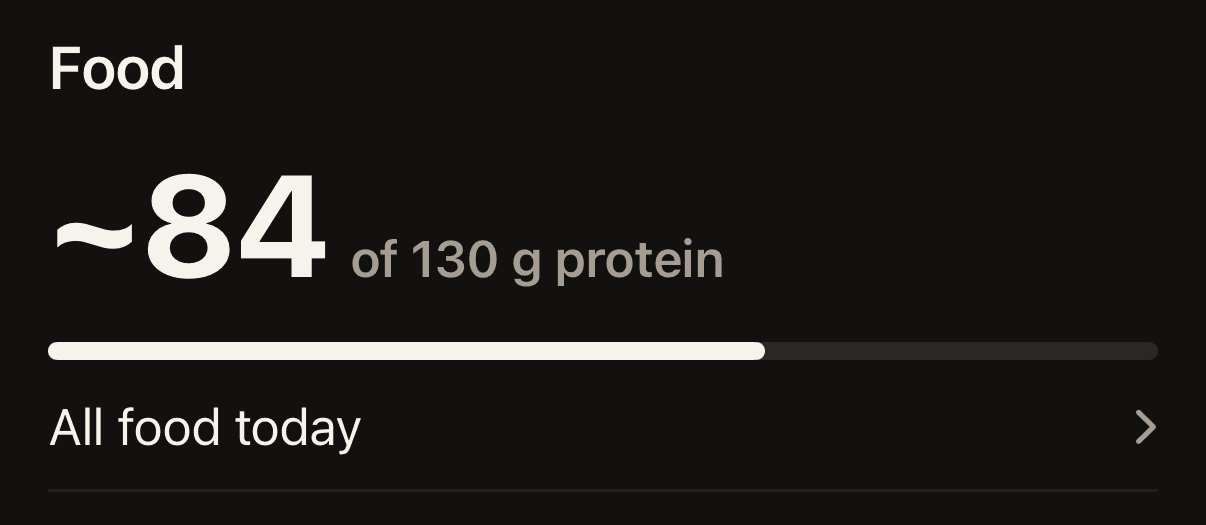
Tuesday is a rest day. The app's Today screen shows the protein you've logged so far against your target for the day. You add your usual meals during setup, and after that each one takes one tap to log. A ~ in front of a number means it's an estimate.
Wednesday
9:00 PM
The coach also messages you between workouts, in the app and on your Lock Screen. You can have it ask you, on the morning of a workout, what time you'll train, and it reminds you 30 minutes before. You can pause the messages for a week or turn them off.
In this example you don't make it to the gym on Wednesday, so the day ends up showing "Nothing logged."

Lower body6:00 PM
Ready for 6:30 PM.
Open workoutChange time
Lower body8:30 AM
What time are you training today?
6:30 PM
Set time
Lower bodyNothing logged
The Lock Screen at 9:00 that night.
Thursday
8:15 PM
After a missed workout, the coach sends a short note the next evening. It shows up on your Lock Screen, and you can reply from there.
- If you don't answer, it messages you less often, then stops until you log a workout or write back.
Your coach
No workout since Monday. There's still time for lower body this week.
Reply
Friday
7:00 AM
Friday starts with the workout you missed.
Upper body is on Saturday now.
The app moves it forward on its own, so Wednesday's lower-body workout is the one you do on Friday. That bumps the upper-body workout you'd planned for Friday, and the coach offers to put it on Saturday. You can say yes or no below.
Saturday was a rest day, and the weights for the workout are further down this page. Next week stays as it was, and you can undo the change below if you change your mind.
Adjust this week
Next week stays as planned.
- Lower body is today's workout.
- Upper body goes on Saturday.
Saturday
9:00 AM
Saturday is a rest day with nothing planned. Saying yes to the coach on Friday puts the upper-body workout here.
Sunday
How your plan gets built.
You tell Regimen, in your own words, what you're training for. You also tell it how many days a week you can train, how long a workout can be, and what equipment you have. It builds a plan that runs for several weeks. The same workouts repeat each week, and what changes is the weight. Some plans include a lighter week with half the sets.
If you've lifted before, setup asks if you already have a program you want to follow. Type or paste it, and your plan is that program as you wrote it: your days, your exercises, your sets and reps. If an exercise has to change, say because your gym doesn't have the machine or you said a movement hurts, it puts a close one in its place and tells you which one and why. If your program can't be used as written, it says so, and why, and builds you a plan the usual way. Once the plan is built you can change it yourself: replace or remove an exercise, change its sets and reps, or move a workout to another day when your schedule changes. For a change that lasts, you tell the coach and look it over before it applies.
If you're new to lifting, the plan uses simpler exercises and starts at no more than three days a week. Each lift opens with a starting guess for the weight, marked with a ~, and you can change it. During a workout, about half the exercises have a short written guide to setting up and doing the movement, and some have a picture.
When a plan ends, the next one starts from what you logged.